Data Representation

Data Representation is a complex subject. People have built their careers in data representations, and some have lost their sleep. While the parent post refers to binary and non-binary data, the subject of data representations is more complex for a single blog post. If you are as old as me and lived through the data representation standardization, you will understand. If you are a millennial, you can reap the benefits of painful standardization of data structures. Semantic Data is still open for standardization.

What is Data?

Data is a collection of datum. Datum is singular, and Data is plural. In the computer language, “Data” is also widely (loosely) used as a singular.

A datum is a single piece of information (a single fact, a starting point for measurement). A character, a quantity, or a symbol on which computer operations (add, multiply, divide, reverse, flip) are applied. E.g., The character ‘H’ is a datum, and the string “Hello World” is data composed of different datum characters.

From now on, we will call ‘H’ and ‘Hello World’ as Data.

What are Data Types?

Data types are attributes of data that tell the computer the programmer’s intent to use the data. E.g., If the data type is a number, the programmer can add, multiply, and divide the data. If the data type is a character, then the programmer can compose the characters into strings. The operations add, multiply, and divide do not apply to characters.

Computers need to store, compute, and transfer different types of data.

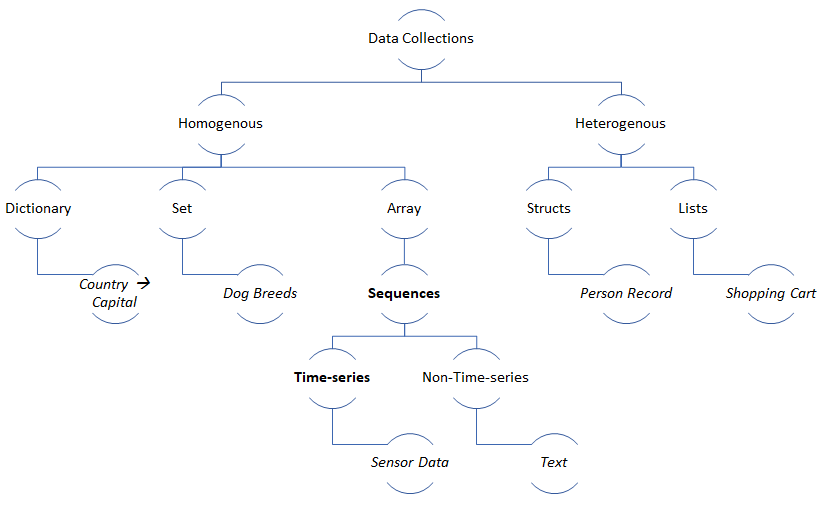
Some common Data types are best described below that illustrate basic and composite data types:

Data TypesExamples
Characters and Symbols‘A’, ‘a’, ‘$’, ‘‘, ‘छ’
Digits0, 1, 2, 3, 4, 5, 6, 7, 8, 9
Integers (Signed and unsigned)-24, -191, 533, 322
Boolean (Binary)[True, False], [1, 0]
Floats (single precision)-4.5f
Doubles (double precision) -4.5d
Composite: Imaginary Numbersa + b*i
Composite: Strings“Heaven on Earth”
Composite: Arrays of Strings[‘Heaven’, ‘on’, ‘Earth’]
Composite: Maps (key-value){‘sad’: ‘:(‘, ‘happy’: ‘:)’}
Composite: Decimal (Fraction)22 / 7
Composite: Enumerations[Violet, Indigo, Blue, Green, Yellow, Orange, Red]
Table of Sample Data Types

What are Data Representations?

Logically, computers represent a datum by mapping it to a unique number and data as a sequence of numbers. This representation makes computing consistent – everything is a number. This mapping is called “Unicode.”

ExampleNumber
(Unicode code points)
HTMLComments
‘A’U+0041&#650x41 = 0d65
‘a’U+0061&#970x61 = 0d97
8U+0038&#560x38 = 0d56
‘ह’U+0939&#23610x939 = 0d2361
Sample Mapping Table

The numbers can themselves be represented in the base of 2, 8, 10, or 16. The human-readable number is base-10, whereas base-2 (binary), base-8 (octal), and base-16 (hexadecimal) are the other standard base systems. The Unicode code points (mappings) above are represented in hexadecimal.

Base-10Base-2Base-8Base-16
0d25
(2*10 + 5)
0b11001
(1*24 + 1* 23 + 0*22 + 0*21 + 1*20)
031
(3*81 + 1*80)
0x19
(1*161 + 9*160)
Base Conversion Table

Computers use base-2 (binary) to store, compute, and transfer data. Computers use base-2 because the electronic gates that make up the computers use binary inputs. Each storage cell in memory can store “one bit,” i.e., either a ‘0’ or a ‘1’. A group of 8 bits is a byte. The Arithmetic Logic Unit (ALU) uses a combination of AND, OR, NAND, XOR, NOR gates for mathematical operations (add, subtract, multiply, divide) on binary (base-2) representation of numbers. In modern memory systems (SSDs), each storage cell can store more than one bit of information. These are called MLCs (Multi-level cells). E.g., TLCs store 3 bits of information – or – 8 (23) stable states. This MLC helps to build fast, big, and cheap storage.

Historically, there have been many different character sets. E.g., ASCII for English, Windows-1252 (expanded ASCII) used by windows-95 systems to represent new characters and symbols. However, modern computers use the Unicode character set for (structural) interoperability between computer systems. The current Unicode (v.13) character set has 143,859 unique code points and can expand to 1,114,112 unique code points.

While all the characters in a character set can be mapped to numbers, precision point numbers (floats, doubles) are represented in the computers differently. They are represented as a composite of a sign, mantissa (significant), and exponent:

± (mantissa) * 2exponent

DecimalBinaryComment
1.51.11 * 20 + 1 * 2-1
33.25100001.011 * 25 + 0 * 24 + 0 * 23 + 0 * 22 + 0 * 21 + 1 * 20 + 0*2-1 + 1*2-2
Binary Representation of Decimal Numbers

The example below shows how 33.25 is converted to a float (single precision) representation – 1 sign bit, 8 exponent bits, 23 mantissa bits:

Convert 33.25 to Binary100001.01
Normalized Form(-1)0 * 1.0000101 * 25
[ (-1)s * mantissa * 2exponent ]
Convert exponent using biased notation
Represent decimal as binary
5 + 127 = 13210 = 1000 01002
Normalize the mantissa
Adjust to 23 bits by padding 0s
000 0101 0000 0000 0000 0000
Represent the 4 byte (32 bits)0100 0010 0000 0101 0000 0000 0000 0000
Floats (single precision) represented in 4 bytes

Some scientific computing requires double precision to handle the underflow/overflow issues of single precision. Double precision (64 bits) uses 1 sign bit, 11 exponent bits, and 52 mantissa bits. There are also long doubles that store 128 bits of information. The arithmetic operations (add, multiple) in the electronics are simplified using this binary representation.

Despite great computer precision, some software manages decimals as two separate fields (numerator and denominator) or (before . and after .) as multi-byte integers. These are called “Fraction” or “Decimal” data types and are usually used to store “money” where precision loss is unacceptable (i.e., 20.20 USD is 20 Dollars and 20 cents and not 20 Dollars and 0.199999999999 dollars).

What is Data Encoding?

Encoding is converting data represented by a sequence of numbers from the character set mapping into bits and bytes. The encoding process could be fixed width or variable width and is used for storage/transfer of data. Base64 encoding uses a fixed width (8 bits) encoding to represent 64 ASCII characters (A-Z, a-z, 0-9, special characters). UTF-8 encoding uses a variable width (1-4 bytes) encoding to represent Unicode character set.

TextBase64UTF-8
earthZWFydGg=01100101 01100001 01110010 01110100 01101000
éarthw6lhcnRo11000011 10101001 01100001 01110010 01110100 01101000
Base 64 encoding resulted in fixed-length representations, and UTF-8 resulted in variable-length representations. UTF-8 optimizes for the ASCII Character set and adds additional bytes for other code points. The character ‘ é ‘ is encoded into two bytes ( 11000011 10101001 ). This variable-length encoded sequence can be decoded because there is no conflict during the decoding process.

Base64 is usually used to convert binary data for media-safe data transfer. E.g., A modem/printer would interpret binary data differently (sometimes as control commands), so a base64 encoding is used to convert the data into ASCII to be media-safe. The Data is transferred as binary; however, since the bytes are ASCII (limited binary), the media/printer is not confused. If you observe, base64 has increased the number of bytes after the encoding. Earth (5 bytes) is encoded as ZWFydGg= (8 bytes). The Data is decoded back to binary at the receiver’s end. The example below shows the process:

1earth (40 bits)01100101 01100001 01110010 01110100 01101000
2Buffer to have bits in the multiples of 6 at byte boundaries (48 bits) [48 is 6 bytes and a multiple of 6]01100101 01100001 01110010 01110100 01101000 00000000
3Regroup into 6 bit bytes011001 010110 000101 110010 011101 000110 100000 000000
4Use Base64 table to map to text (see Wikipedia for base64 map)ZWFydGg=
5Convert to binary to send to store or transfer01011010 01010111 01000110 01111001 01100100 01000111 01100111 00111101

There are many different types of encodings – UTF-7, UTF-16, UTF-16BE, UTF-32, UCS-2, and many more.

What is Data Endianness?

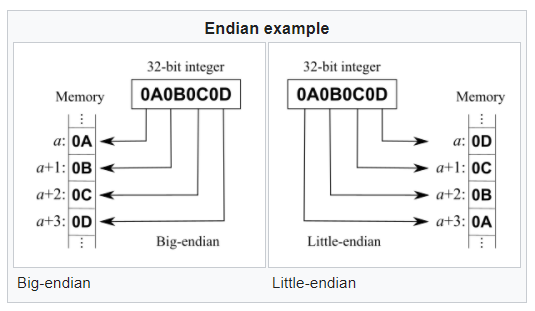
Endianness is the order of bytes in memory/storage or transfer. There are two primary types of Endianness: big-endian and little-endian. You might be interested in middle-endian (mixed-endian), and you can google that on your own.

As you can see in the diagram below, the computer may represent the data starting with the most significant byte (0x0A) or the least significant byte (0x0D).

Courtesy: Wikipedia

Most modern computers are little-endian when they store multi-byte data. Networks are consistently big-endian. So, little-endian memory dumps have to arrive at the network as big-endian.

Summary: There are many data types – basic (chars, integers, floats) and composite (arrays, decimals). Data is mapped to numbers using a universal character set (Unicode). This Data is represented as a sequence of code points in Unicode and converted into characters (or bits/bytes) using an encoding process. The encoding process can be fixed-length (E.g., Base64, UTF-32) or variable length (UTF-8, UTF-16). Computers can be little or big-endian. Modern CISC computers (Intel x86) are little-endian, and RISC computers (ARM Processors) are big-endian. Networks are always big-endian.

Tips/Tricks: Stick to Unicode character set and UTF-8 encoding scheme. Use Base64 to transfer data to be media-safe (e.g., base64 encoding of strings in HTTP URLs to make them URL-safe). Using a modern programming language (E.g., Java) abstracts you from the Endianness. If you are an embedded engineer programming in C, you need to develop code to be Endianness safe (e.g., type casts and memcpy).

Even with all this structure, we cannot convey meaning (semantics). An ‘A’ for the computer is always U+0041. If the programmer wants to transfer ‘A,’ ‘A,’ or ‘A,’ more information is encoded for the receiver to interpret. More on that in future blogs.

This one was too long even for me!

Agile Team Composition – Inequality Lens

This is a very opinionated post. More opinionated than some of my previous posts. This post is not about roles in a team (scrum master, product owner, developer, tester) or supporting structures (product management, architecture, DevOps) or in/outsourcing members. This post is also not about the skill homogeneity (homogenous, heterogenous) of an agile team. This post is about the inequality (experience and salaries) of team members within an agile team.

It’s common sense that the team should be composed of skills required to do the job and roles to perform functions. These two are necessary ingredients for a good scrum team.

If you are building a data lake, you need data engineers (competencies/skills). But, data engineer experience ranges from 1-year experience to 20 years of experience. The salary ranges from 5L INR/USD to 45L INR/USD. So, how do we compose teams?

Some unwritten industry rules:

Rule A: The more experienced you are, the expectation moves from being hands-on on a single project to a mentor/coach for multiple projects. A mentor/coach competency is different from engineering a product (hands-on) competency. Adding to the irony, nobody respects a coach who is not hands-on (unlike a sports coach). Salary expectations from experienced individuals also drive this.

Rule B: The more experienced you are, the expectation moves from being a developer/tester to a scrum master, lead engineer, or architect. Many engineers hop jobs to seek out these opportunities. It’s a crime to be a developer/tester for life. The industry critically judges life-long developers/testers (there is nothing wrong with it if your passion is to build). All engineers face the dilemma of salary growth driven by opportunities in contrast to their core skills and passions. That’s life.

Rule C: The less experienced you are, the industry wants to pay you less than your experienced counterparts, irrespective of your skills and credentials. The expectation is that you are a worker bee and not a leader bee, regardless of your leadership credentials. There are exceptions, but the norm is to classify you into developer/tester class. The manager says: “Work your way up.” It’s like the harry potter sorting hat @ work automatically sorting you first by experience and then by credentials.

Agile (with its egalitarian view) challenges this status-quo. Treat everybody equally says agile. How?

In reality, a pay disparity within a team auto-magically drives a command-control structure. Salaries are usually an open secret. This new agile egalitarian structure drives people to respect each other as equals on the surface, but not in spirit.

“Who wins? Capitalist or Socialist? The capitalist, of course,” is the shout-out from the management coach. “That’s the only thing that has worked for humanity.”

With this in-spirit inequality, the agile coach commands: “Self-organize yourself.” The two-year-old experienced software engineer is scared to take the (tie-suit) role of product owner, and the (tie-suit) product owner cannot massage her ego enough to do the developer role. This structure is the new corporate caste system.

Critics of agile target this egalitarian view. Committees cannot make decisions. You need an escalation and decision structure with “one” accountable neck to chop.

An example that works: The five founders of a company working with agile principles to self-organize themselves for the company’s success. There is an in-built expectation that the scale of investment (money, time) drives eventual profits.

Counter Example: A software development team with an experience pyramid working with agile principles to self-organize themselves for the group’s success. People will stick to their roles and view team success from the specific role lens that they own. Scrum masters to drive agile values (huh! no they are just trackers), Product owners to bring requirement clarity, architecture owners to bring design clarity, and engineers to build. Agile purists say that self-organizing means pulling and sharing work and has nothing to do with roles. I disagree; there is more to it! Roles define work types. It’s a culture change that is hard to achieve with in-built in-equality.

It’s human nature to accept the new corporate caste system and reject the religious ones.

Somewhere the capitalist is laughing: “Want to make more money? Take risks and Lead. I will invest, and you will still serve me. Ha ha ha. Money makes more money. So, make more money to make more and more money. Structures exist to control, and deliberately unequal. Welcome to my caste system. Do or die

Finally, after all that rant, My opinion: A purist agile egalitarian approach is not practical in our current world-view. A team must be composed of people with an experience pyramid with a minimum expectation of mutual respect. In a mature team composed of members (not driven by salaries and opportunity, but by a shared vision), self-organization is more practical, but it’s not the norm. A shared vision is not a norm; the expectation of a shared vision is. The leader drives the vision, and teams share the responsibility to deliver the vision. Capitalistic values drive new world order where in-built in-equality is tolerated as an acceptable tradeoff.

Some day we will grow out of this one too; or become a capitalist.

Delegation

Ask, Don’t tell :::: Tell, Don’t Ask :::: Don’t Ask, Don’t Tell

For those of us in software, we know about the two programming paradigms that are used widely in the industry – Object-Oriented and Functional. The object-oriented paradigm is usually termed as the “Tell, Don’t Ask” model, where the data and behavior are kept together. The functions in the object-oriented paradigm change state of the object (i.e., cause side effects). The functional paradigm is usually termed the “Ask, Don’t Tell” model, where the functions don’t change state and cause no side effects. The software security implementations favor the “Don’t Ask, Don’t Tell” – or weakly the principle of least privileges.

These software models are just copied over from the management/leadership principles. It’s all about delegation.

  1. Tell, Don’t Ask: Delegates responsibility and authority.
  2. Ask, Don’t Tell: Does not delegate responsibility or authority.
  3. Don’t Ask, Don’t Tell: Intentional Non-transparency.

The management coaches will scream: “You should delegate responsibility, but not accountability.”

The agile coaches will correct the statement: “You should delegate responsibility and authority, but not accountability.”

This one everybody agrees – The accountability lies squarely on the first line leader a.k.a. the project manager. However, the project manager is encouraged not to micro-manage but to delegate responsibility and authority to the scrum teams.

Not all scrum teams are alike because not all people are alike and have different natures (due to the nature/nurture mix) that drive their behaviors. Some people follow commands, whereas others question the status quo. Some people focus on problems, and others focus on solutions. When a scrum team is formed, and people with different backgrounds are put together, delegating responsibility and authority can be challenging. Some scrum teams will accept responsibility but will defer the authority to the leadership. Other scrum teams will not accept responsibility without authority.

Example: The architect is accountable for defining the architecture, and the scrum team is responsible for implementing the architecture. In this model, responsibility is delegated, but the authority to make architectural choices are not. Depending on the culture (largely nurture) you come from, the scrum teams would be either happy or revolt.

Not all people are made equal or nurtured equally. Some people have lived prosperously and always made their choices. Others have lived in a command control structure and always had to make the commander’s choice their own. When people of different natures are put together in a scrum team, the team takes a while to form, norm, and perform. Delegating to such scrum teams takes patience.

Hence, agile coaches ask not to break the scrum teams. Don’t allocate people to projects; assign projects to scrum teams. This principle also means that we don’t treat people like resources (i.e., people resources allocated to projects, but we assign projects to people teams). So, treat people like people (just like you treat code like code and infrastructure as code).

Summary: The project manager must delegate responsibility and gradually delegate authority (depending upon the scrum team the project manager has to deal with). Delegating authority creates an egalitarian environment that people (even from working democracies) will need to adapt.

Activities vs. Outcomes

The operation is successful but the patient died – A day in life of a doctor

It’s classic. The outcome expected by the patient’s relatives from a heart surgery is that the patient’s condition improves. The surgical team performs many activities (wheeling the patient into the surgery room, anesthesia for the patient, monitoring vitals, and many more) pre-operative, intra-operative, and post-operative. Eventually, If the patient does not recover, the team will still claim that all the activities were successful.

Successful activities don’t necessarily lead to a successful outcome. Successful activities are necessary but not a sufficient condition.

In a software development context, to reach a goal, a team performs many activities. They may spend many sprints busily doing activities. The burn charts will show that work is being done and accepted, but alas, the outcome may not be in sight for many months. In Agile, we break down a business EPIC into Features, Features into Stories, and perform tasks to claim a story. The customer (or proxy) defines the outcome in the EPIC, and the acceptance of features, stories, and tasks are just activities. Successful completion of the features, stories and tasks does not guarantee a successful outcome.

The Feature burn charts look good, and teams like to showcase these charts to demonstrate progress. Progress is necessary but not sufficient for an outcome.

A few things can happen when the team completes all the features in an EPIC

  1. Successful Outcome: The team accepts all features of an EPIC, and the customer (or proxy) accepts the EPIC.
  2. Partial Successful Outcome: The team accepts all features of an EPIC, and the customer (or proxy) gives new inputs or flags issues to the team. The EPIC is not accepted, and issues are added to the EPIC, or the existing EPIC is accepted, and new EPICs are created to handle new inputs (scope increase).
  3. Failed Outcome: The team accepts all features of an EPIC, and the customer (or proxy) does not accept the EPIC, and the team has to significantly re-plan.

If the customer (or proxy) is engaged continuously, #3 is an anomaly, but it can happen. A Partial successful outcome (#2 above) would be the most likely outcome unless the EPIC were very well defined, tiny, and non-ambiguous. But we are agile to deal with ambiguities. To handle new features (scope creep), the teams create a new EPIC V2.0. To handle issues (bugs), the teams create issues in the EPIC and plan to close this debt (at least some of them) before new features are prioritized, and the EPIC can be (reasonably) accepted.

Going back to our heart surgery, the team may have planned the exact features in the surgery (e.g., Stent the artery), but during the surgery, they may find anomalies that need to be taken care of other than just stenting the artery. These anomalies take time (effort) to fix, and the surgery time may increase. The surgeon may also detect anomalies that might require a new surgery (new EPIC) to handle during the surgery. After the surgery, the patient may have BP stability issues (hypotension) and is on NOR (Norepinephrine) to maintain blood pressure and stabilized in the ICU before being discharged (discharge: A successful outcome).

Summary: Activities lead to outcomes. This activity completion is necessary but not sufficient. Successful activities may lead to failed outcomes. Organizing and Planning work (in EPICs/Features/Stories) is important for efficiency and predictability. However, in most practical cases, things go wrong. Sometimes, more work has to be done that causes the effort in a feature to shoot up, OR more work has to be done before a feature can be claimed to be done, OR new requests prop up after an EPIC is claimed.

There is a need to separate “organizing work” and “seeking outcomes” so that both efficiency metrics (lead metrics: say/do) and outcome metrics (lag metrics: KPIs) are tracked.

Data about Data

As a Data Engineer, I want to be able to understand the data vocabulary, so that I can communicate about the data more meaningfully and find tools to deal with the data for computingData Engineer

Let’s start with this: Binary Data, Non-binary Data, Structured Data, Unstructured Data, Semi-structured Data, Panel Data, Image Data, Text Data, Audio Data, Categorical Data, Discreet Data, Continuous Data, Ordinal Data, Numerical Data, Nominal Data, Interval Data, Sequence Data, Time-series Data, Data Transformation, Data Extraction, Data Load, High Volume Data, High Velocity Data, Streaming Data, Batch Data, Data Variety, Data Veracity, Data Value, Data Trends, Data Seasonality, Data Correlation, Data Noise, Data Indexes, Data Schema, BIG Data, JSON Data, Document Data, Relational Data, Graph Data, Spatial Data, Multi-dimensional Data, BLOCK Data, Clean Data, Dirty Data, Data Augmentation, Data Imputation, Data Model, Object (Blob) Data, Key-value Data, Data Mapping, Data Filtering, Data Aggregation, Data Lake, Data Mart, Data Warehouse, Database, Data Lakehouse, Data Quality, Data Catalog, Data Source, Data Sink, Data Masking, Data Privacy

Now let’s go here: High volume time-series unstructured image data, High velocity semi-structured data with trends and seasonality without correlation, High volume Image data with Pexels Data source masked and stored in Data Lake as the Data Sink.

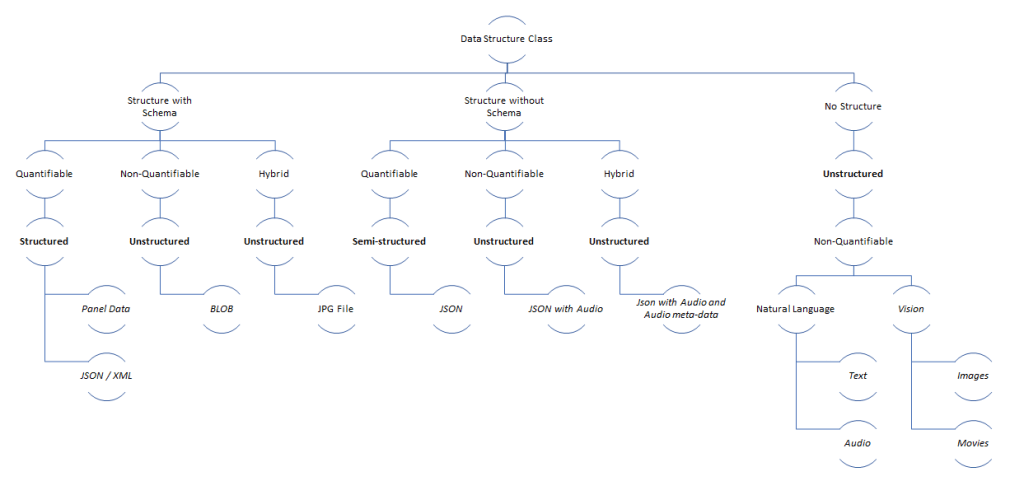
The vocabulary is daunting for a beginner. These 10 categories (ways of bucketizing) would be a good place to start:

  1. Data Representation for Computing: How is Data Represented in a Computer?
    • Binary Data, Non-binary Data
  2. Data Structure & Semantics: How well is the data structured?
    • Structured Data, Unstructured Data, Semi-structured Data
    • Sequence Data, Time-series Data
    • Panel Data
    • Image Data, Text Data, Audio Data
  3. Data Measurement Scale: How can data be reasoned with and measured?
    • Categorial Data, Nominal Data, Ordinal Data
    • Discreet Data, Interval Data, Numerical Data, Continuous Data
  4. Data Processing: How is the data processed?
    • Streaming Data, Batch Data
    • Data Filtering, Data Mapping, Data Aggregation
    • Clean Data, Dirty Data
    • Data Transformation, Data Extraction, Data Load
    • Data Augmentation, Data Imputation
  5. Data Attributes: How can data be broadly characterized?
    • Velocity, Volume, Veracity, Value, Variety
  6. Data Patterns: What are the patterns found in data?
    • Time-series Data Patterns: Trends, Seasonality, Correlation, Noise
  7. Data Relations: What are the relationships within data?
    • Relational Data, Graph Data, Document Data (Key-value Data, JSON Data)
    • Multi-dimensional Data, Spatial Data
  8. Data Storage Types:
    • Block Data, Object (Blob) Data
  9. Data Management Systems:
    • Filesystem, Database, Data Lake, Data Mart, Data Warehouse, Data Lakehouse
    • Data Indexes
  10. Data Governance, Security, Privacy:
    • Data Catalog, Data Quality, Data Schema, Data Model
    • Data Masking, Data Privacy

More blogs to deep dive into each category and the challenges involved. Let’s peel this onion.

Tunnel Vision

When I drive through a tunnel with my kid, there are two points of excitement – entry point and exit point. When entering a new tunnel, it’s always a “Yay!!” The exit feeling depends on how long we were inside. It’s either the expression – “Finally some light” or “Oh, no, we are out.”

You get my point. We love tunnels. We like to see the light at the end of the tunnel.

We not only love tunnels, but we love to tunnel. Tunneling helps us focus, and there is a focus threshold after which we need to see some light.

Sprinting in agile is Tunneling. After a two-week sprint, we might have the expression, “Oh, no, we are out too soon.”, and after a four-week sprint, we might have the expression, “Finally, some light.”

A two weeks sprint seems to be a global average of adequate time in a sprint. While that is an indicator, the team must choose their sprint duration.

Not all people are alike. Some people like to be first finishers – Tunneling helps them to get from A to Z fastest. However, we remember our journeys for unplanned explorations. Can we visit that lake nearby? Can we bathe in that waterfall? Can we take a different road?

In software projects, the expectation from engineers/architects is that they build a path from point A to Z as fast as possible (tunnel), but the way should be open to exploration by the user. E.g., Build a mobile user interface to update my health parameters, but let me explore new services in the user interface to improve my health.

If you are agile, you can introduce innovation experiments to explore users unwritten needs, making your own journey not feel like a long tunnel.

Takeaway: We need black-box tunnels, exciting tunnels, and open roadways, and in agile software parlance, that loosely equates to sprints, spikes, and MVPs.

Go Slow to Go Fast

“I am adopting Agile; finally, I can tell my customers that since we are going to be agile, the delivery will be late. The agile coach told me that to go fast; you need to slow down. If the customer has questions, I will ask the agile coach to help convince the customer” – Project manager

Sometimes, projects need to be rescued. They have either messed up the quality, or schedule, or both. They had some “accurate estimations” done 12 months back for the entire project. Now they have to prove that their estimations were not wrong irrespective of the scope creep, requirements ambiguities, technology risks that popped up, and COVID impacting day-2-day life.

Such projects can be rescued without agile principles. The team can get a stock of current realities and re-plan, and continue this process until successful. There are very successful waterfall projects. There are failed waterfall projects that were rescued with waterfall. A non-agile method to rescue the project will still ask you to stop, re-plan, and continue, i.e., go slow (stop-think) to go fast.

An agile method to rescue the project will also ask you to stop, re-plan, and continue iterations. i.e., deliver a small “good” quality feature increment that does not break the product, then continue. While some team members have a sprint tunnel vision, others will look beyond a sprint to ensure that they have “ready” features to add to the product when they meet their DOD, and their stories are accepted. After some sprints, the team knows more about its velocity and can predict a schedule (with a guaranteed quantum of quality). The backlog would also be groomed (prioritized, broken-down, detailed) in parallel by the product owners while the team is sprinting on the stories that were picked up. Agile enables teams to continue on features that are “ready” and not “halt.” If the reason for distress is “quality,” then the stories could be “debt” that must be paid off until we can build some more.

Agile is not an excuse to stop. Even when you are agile, you can accumulate debt that results in an inferior quality product, and prioritization/judgment must ensure that the debt is not out of control. There is always good debt (to gain speed) and bad debt (than hampers quality); and some intersection of the two. Even in agile, there is an in-built “stop” with iterations and a “STOP” requested by the team/customer.

Takeaway: Agile or non-agile a project in distress requires to stop, think, and continue.

A best practice that I have used to prevent projects to get into a bad state is to build an architectural runway (intentional architecture) outside the sprinting zone. “Readiness” to sprint is critical for success of the team.

Data-driven, Metric-driven

Some say they are the same – metrics are computed on data. So, I must be data driven if I am already metric driven.

I claim that they are different. Agile combines them together in a nice way.

You would be metrics-driven to achieve a goal. Goal coaches insist that goals should be SMART (Specific, Measurable, Attainable, Realistic/Relevant, and Time bound). E.g., I want to be an millionaire in one year is a SMART goal, that can be measured along the way (lead metrics) and once an year has elapsed (lag metrics). The lead metrics tell you whether you are on the right path to achieve the goal, while the lag metrics tells you whether you have achieved or how well you have achieved the goal.

You would be data-driven when you have to deal with ambiguities. Data coaches insist that good quality data must be captured continuously to seek insights that can be converted to knowledge and actions. E.g., I want to drive academic excellence for my child this year. This statement does not tick all the boxes of SMART. It does not say that my child should score A+ in mathematics. There is inherent ambiguity in the statement and choice of words (“excellence”). In such situations, you collect data from tests, teachers feedback, and your own observations. Based on the data, you get insights – the child is great at arts, excellent at mathematics, and needs improvement in language. You then focus on sustaining the strengths (arts, mathematics), and focus on development needs to improve academic excellence. Being data-driven is all about seeking actionable insights. You may make a decision to not take any action to improve language skills and let the child excel in her strengths, but that’s still a data-driven decision.

Agile helps with the cone of uncertainty with the levels of agility. E.g., In a software development context, the team may look at lead metrics like flow velocity and team happiness to determine whether we are on the right track to reach the outcome measured by the lag metrics. However, the team will also look at data (new features, technical debt, customer feedback) to derive whether a change of course is required. So, you get the benefit of both being iterative. Being iterative, and taking small chunks of work to do (stories with 8 story points), you can be metric-driven (SMART) to measure say/do as a lag-metric. Also, grooming the product backlog with insights from data, you will be data-driven.

Technical Career and Competencies

Some people plan their careers. Others don’t and let it happen. Which one is better?

A great career coach will talk to you and advice to either plan or to flow. A good career coach will always ask you to plan. A mediocre career coach will ask you to flow.

Expertise is a necessary attribute for a great career, but not sufficient. A performance track record is another necessary attribute for a great career, but not sufficient. Presidential communication and influencing skills is yet another necessary attribute for a great career, but not sufficient.

It’s easy to list down the ingredients of a great recipe (methods for a great career), but different cooks with the same recipe have different results. So, there is also some luck and practice involved.

For this blog post, lets focus on EXPERTISE. Early technical careers are measured by the depth of technical competencies. Technical competencies define late career choices as well. My advice has always been to develop 1-2 competencies in early career to build depth. Some broad technical competencies are:

Web (Cloud Scale) Software
Enterprise Software
Device (Mobile) Software
Device (Embedded) Software
Security and Privacy
Artificial Intelligence (BI/ML)
Data Engineering
DevOps
Test Automation
Robotic Process Automation
Operations Research
Agile

The list is not comprehensive, but is a classification of the type of software problems that software engineers & architects solve today for the market. The engineers have to build different mindset and skills for each class of problems.

E.g., As a Web Software Engineer, you would need to have the mindset of building for scale, and skills to debug programs that may fail at scale. As a Device (Embedded) Software Engineer, you would need to have the mindset of building for scarcity (memory, cpu), and skills to debug programs with concurrency related failures. As a Enterprise Software Engineer, you would need to have the mindset of integration, and skills to debug programs with integration/messaging problems with other systems. As a Data Engineer, you would need to have the mindset of processing data in batches, and skills to find anomalies and patterns in data. As an Agile/DevOps Engineer, you would need to have the mindset of continuous improvement, and skills to automate workflows.

Best bet – early in the career, if you know your natural mindset, you can choose a competency that fits you. Later, choose a competency that challenges you.

Don’t choose a competency that claims to maximize your cash flow. So, work to strengthen your strengths, and later work on your development opportunities.

Summary: Once you plan you need to let it happen, and measure your happiness. If you are not satisfied with the flow, you need to plan a change. Rinse-repeat until you are settled and happy. If you are content, plan to change.

Myth: Architects only create Diagrams

Like it or not. Diagrams (visual) are a great communication tool. If one of the responsibility of architects is communication, there is no better way than visual communication. Contextual communication requires that the same information to be represented differently for effective communication.

Architects (titled or not) have a responsibility to analyze data from various sources:

a) Requirements coming from customer or product manager.
b) Complaints coming from customer or product manager.
c) Constraints coming from customer or product manager.
d) Constraints and opportunities from operational leaders.
e) Technology advances in industry.
f) Patterns and practices in architecture.
g) Feedback from development teams.
h) Feedback from independent consultants (peers, stakeholders).
i) Inputs from security teams.
j) Inputs from operational teams.

All this data needs to be analyzed to produce conceptual and detailed sketches (as required) for construction. Today, most of these sketches are conceptual. Teams are very skilled to develop the detailed sketches right in code.

The architect is like a data scientist working on all this data to determine the function that ‘fits’. This function is represented as a diagram – a view, or a perspective. The diagram could even be a simple table.

Stating that ‘architects only create diagrams’, however, is a poor critique of the effort. Creating conceptual clarity is important for the architect. But the architect’s job does not end at diagrams. They have to communicate, plan, and code. Unless, the diagram is realized, it’s useless.

Just like code and configuration should be treated like ‘code’; documentation and diagrams also need to be treated like ‘code’. This means – reviewed, maintained, tested, critiqued, destroyed, re-factored, …

Only treating ‘code’ like ‘code’ is bad ‘coding’. Code, configuration and concepts need to be treated like ‘code’.

Dismissing concepts (usually the work of an architect) is immature.

The best representation of ‘architecture’ is ‘code’. The first draft’s of ‘code’ are ‘concepts’. ‘Concepts’ are represented as ‘diagrams’ for communication. AND. communication is a good thing.

Enough said.